
Oman Visa Check Online Complete Step By Step Guide 2026
Worried that your Oman visa might be approved, rejected, or canceled? Check your Oman visa status online in minutes using your passport number and other simple methods through official portal. Follow our complete step by step guide to get accurate updates fast.
Disclaimer: This website is for informational purposes only and is not affiliated with any official website or brand; our goal is to provide accurate, helpful, and easy to understand guides for our visitors.
Oman Visa Check Online With Official Website Complete Guide
Easily check your Oman visa status online through the official website in just a few minutes. Verify your visa approval, validity, and application details quickly and securely by following our simple step by step guide before you travel.
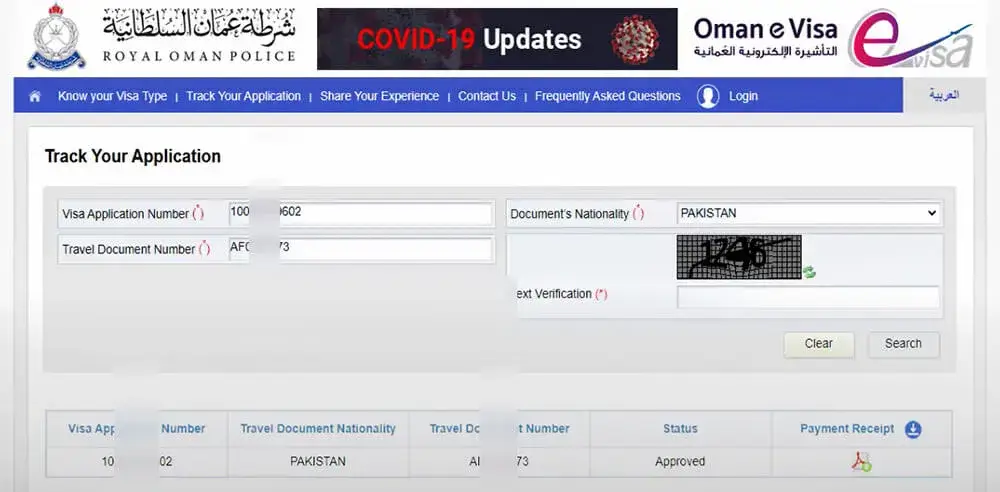
Step 1: Go To The Official “ROP” Website.

Step 2: Click On “Track Your Application”

Step 3: Put Your “Visa Application Number”

Step 4: Put Your “Travel Document Number”
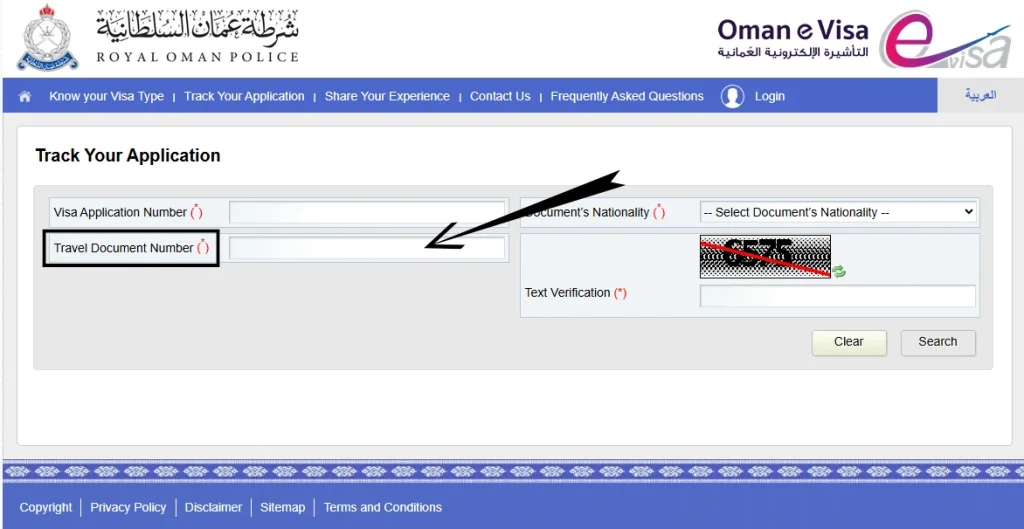
Step 5: Select Your “Document’s Nationality”
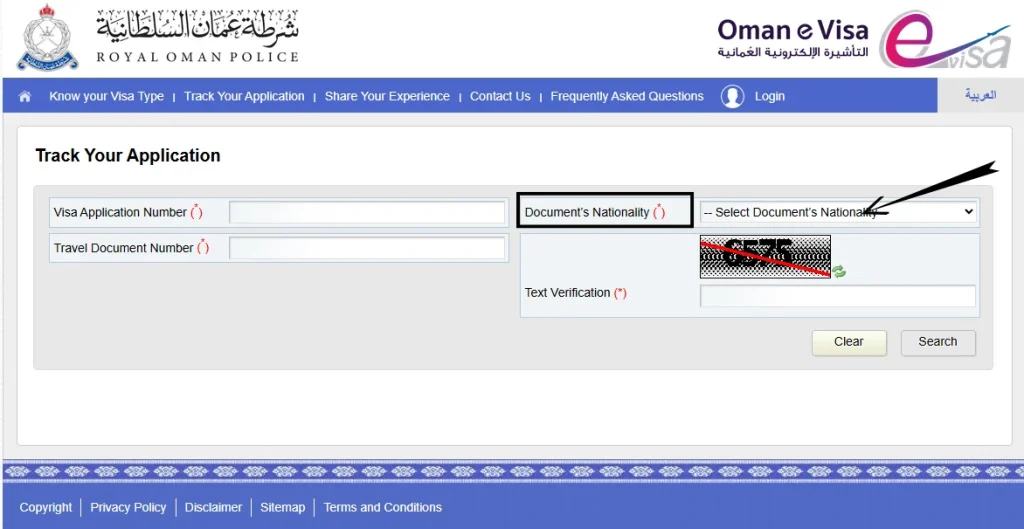
Step 6: Enter “Captcha Code”
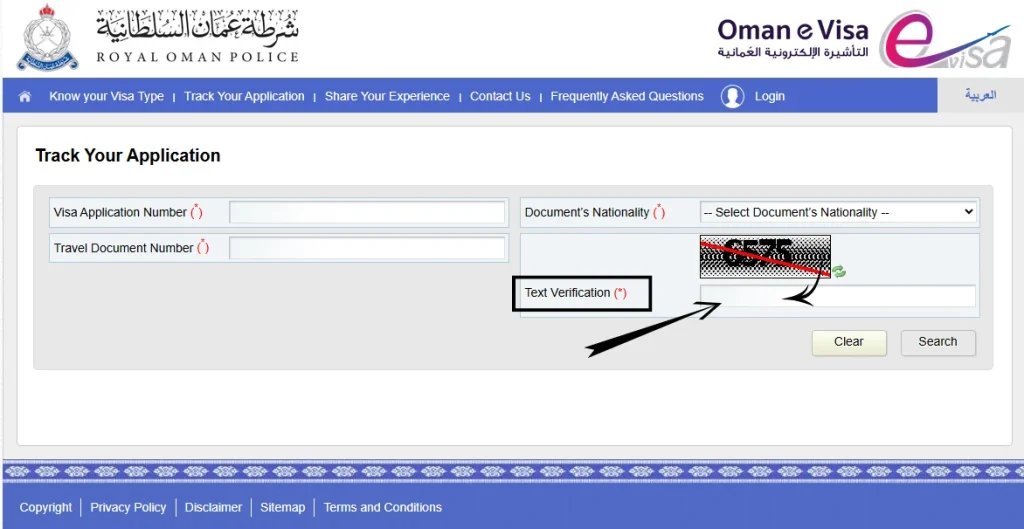
Step 7: Click on The “Search”
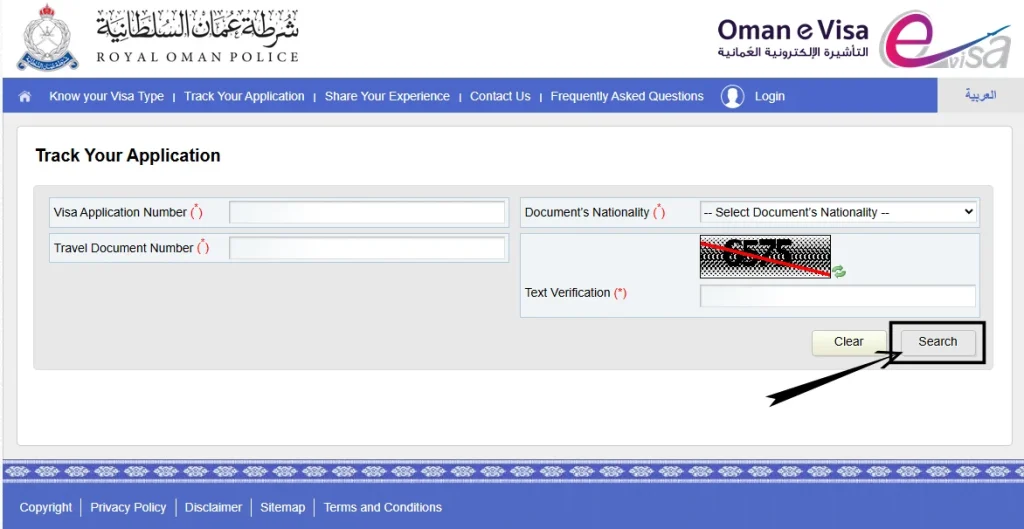
After completing these steps, you can easily view your Oman visa status on the screen. The system will instantly display your visa details, including approval, validity, and expiry date making it quick and convenient to stay updated before your travel.
Oman Visa Check By SMS
No smartphone or internet? No problem. Get your visa status via SMS it’s quick and works anywhere with mobile service.
⚠️ Important: The SMS service availability varies by region. If your text doesn’t get a response, try the online method instead, which is available everywhere.
What Information Do You Need?
Before you check your status, make sure you have these details ready. It only takes a minute to gather them:
| Information Needed | Where to Find It | Why It’s Required |
|---|---|---|
| Passport Number | Your passport, first page | Used to verify your identity and match your application |
| Visa Application Number | Your confirmation email after applying | Your unique application reference—the most direct way to check status |
| Nationality Information | Your passport or ID document | Confirms your identity in the system |
| Registered Mobile or Email | The contact info you used when applying | For receiving updates and confirmations about your application |
Pro Tip: Save your visa application number and confirmation email immediately after submitting your application. Copy them to your phone’s notes or email them to yourself. You’ll thank yourself later!
Why Checking Your Visa Status Matters
It’s more important than you might think. Staying on top of your visa status protects you legally and helps you plan confidently.
Key Takeaway: Regular status checks keep you informed, prevent surprises, and ensure you’re always compliant with Oman’s visa regulations.
Explore Types Of Oman Visa
Different visas have different requirements and benefits. Knowing your type helps you understand what to expect:
🎒 Tourist eVisa
Designed for leisure travelers and sightseers. Perfect for vacations and exploring Oman. Typically offers single entry with a fixed duration. This is the most common visa type for first-time visitors.
💼 Business eVisa
Ideal for professionals attending meetings, conferences, or corporate events. Offers the flexibility needed for short business trips with quicker processing in most cases.
👨👩👧 Family Visit Visa
Made for connecting with relatives living in Oman. The easiest option for family visits with fewer formalities. Perfect when you already have someone sponsoring you in country.
How To Apply Oman Visa Complete Guide
Applying for an Oman visa is simple when you follow the correct steps. Here’s a complete guide to help you submit your application successfully:
1. Visit the Official Oman eVisa Portal
Start your application by visiting the official Royal Oman Police (ROP) eVisa website. This is the authorized platform for all Oman visa applications.
2. Create Your Account
Register with a valid email address and create a secure password. Your account will allow you to submit, track, and manage your visa application online.
3. Choose the Right Visa Type
Select the visa category that matches your travel purpose, such as a Tourist Visa, Business Visa, or Family Visit Visa. Choosing the correct visa type helps avoid delays during processing.
4. Complete the Application Form
Carefully enter your personal information, passport details, and travel plans. Make sure all information matches your official documents to prevent application issues.
5. Upload Required Documents
Prepare and upload clear copies of the following documents:
6. Pay the Visa Fee Securely
Complete the online payment using a valid credit or debit card. Visa fees vary depending on the selected visa category and duration of stay.
7. Submit Your Application
Review all details carefully before submitting. Once you’re sure everything is accurate, submit your Oman visa application for processing.
8. Receive Your Confirmation Email
After submission, you’ll receive a confirmation email containing your application reference number. Keep this number safe, as you’ll need it to track your visa status.
9. Track Your Oman Visa Status
You can check your Oman visa status online anytime using your passport number or application number through the official visa status portal.
10. Download and Print Your eVisa
Once your visa is approved, download the eVisa PDF and print a copy. Carry it with you when traveling to Oman for a smooth entry process.
How Will I Know If My Oman Visa Is Approved?
When your Oman visa is approved, you will receive an official notification via email or through your sponsor or visa processing agency. The approval message will include important visa details and instructions for downloading your eVisa.
Important: Approved Oman eVisas are usually sent directly to your registered email address. For employment visas, your employer or sponsor may provide the approved visa copy.
What Happens If My Oman Visa Is Rejected?
If your Oman visa application is not approved, the visa status will show “Rejected” on the official portal. In most cases, the relevant authorities or your sponsor will provide information about the reason for rejection. You can also check your application status online using your passport number or application reference number to stay updated throughout the process.
Understanding Your Visa Result
Your application will result in one of three statuses. Here’s what each one means and what to do next:
Visa Approved
Visa Rejected
💡 Important Note: If your application shows “Pending,” don’t worry. Most applications move through the pipeline within 24-48 hours. Check again tomorrow, or contact the ROP if it’s been longer.
Common Visa Check Issues & Solutions
Even with straightforward checking, some users encounter small issues. Here’s how to handle them:
❌ No Results Appear
Why it happens: Your passport number or application number might have a typo, or the system hasn’t updated yet.
How to fix it:
❌ Website Is Slow or Down
Why it happens: High traffic or routine maintenance can temporarily affect the portal.
How to fix it:
❌ False Results Appear
Why it happens: Similar passport numbers or system errors can occasionally pull wrong data.
How to fix it:
Key Features of Oman Visa Check Complete Guide
| Advantages | Limitations to Know |
|---|---|
| Real-time updates — See your status instantly | Website downtime — Portal can be slow or temporarily unavailable |
| 24/7 access — Check anytime, anywhere | Update delays — System may take hours to reflect changes |
| Simple process — Just your passport or application number | Internet required — Need stable connection (SMS is alternative) |
| Detailed information — Visa type, validity, issue date, expiry | Data privacy — Personal info entered online (minor risk) |
| Two methods available — Online or SMS options | Input errors — Typos can give false results |
| Secure platform — Official government system | SMS availability — Limited to certain regions |
What to Expect From Oman’s Visa Check System
Pro Tips For Success
Make your visa checking experience smoother with these best practices:
1️⃣ Save Your Application Number Immediately
The moment you submit your application, save the confirmation email and application number in multiple places: your phone, email, and a document on your computer.
2️⃣ Check Regularly But Don’t Obsess
Check every day or two for peace of mind, but remember that most applications take 24-48 hours. Checking multiple times an hour won’t speed things up.
3️⃣ Act Quickly on Approval
Once approved, download and print your eVisa immediately. Don’t wait—have it ready before you book flights or finalize travel plans.
4️⃣ Keep Records Safe
Store your eVisa PDF in cloud storage (Google Drive, Dropbox) and keep printed copies in your passport. Multiple backups protect you.
5️⃣ Verify Dates Carefully
When you see your status, check the visa validity and expiry dates carefully. Make sure they match your travel plans. If something seems wrong, contact the ROP immediately.
6️⃣ Verify Your Information Accuracy
Stay updated on Oman’s visa requirements by visiting the ROP website regularly. Rules can change, and you want the latest information before checking or traveling.
Contact Details
FAQ’s
Conclusion
Checking your Oman visa status is straightforward when you have the right information. With either the online portal or SMS method, you’ll always know where your application stands. Stay organized, check regularly, and prepare accordingly. Your Oman adventure is just around the corner!